


Why Knowing What HTTPS Is Still Matters
The internet quietly transitioned from an unencrypted open system to encrypted one, and most users barely noticed it happening. Roughly between 2014 and 2018, HTTPS went from something many websites treated as optional to something every serious public website was expected to have. HTTPS is the protected version of HTTP, the basic system browsers use to request websites and receive pages back. The important difference is that HTTPS encrypts the connection between your browser and the website, so the network in between cannot normally read or quietly change what is being sent. But as HTTPS became the default, browsers also made it less visible. Instead of showing people the technology underneath the page, modern browsers mostly surface the issue only when something is wrong: a “Not Secure” label, a warning badge, or some other quiet signal that the connection is not protected. That creates a strange situation where one of the most important security upgrades in the history of the web now protects people every day, while many of them have never been taught what it is, what it does, or what it does not do.
It is not surprising that many people have never heard the terms HTTPS or SSL, even when they spend their careers around internet businesses. Browsers still expose those details if you click around the address bar, but most people have little reason to go looking for them, and what’s there wouldn’t mean much without context. That makes sense in one way, because HTTPS became the expected default and people should not need to think about certificates every time they open a website. But I do think something was lost. As long as plain HTTP still works, hiding the language too well leaves an opening for a knowledge gap. The result is that terms like HTTP, HTTPS, and SSL can feel completely unfamiliar, even though HTTPS is part of the full address for almost every serious website people use, just no longer something browsers usually put in front of people.
The reason this matters is that the internet is not a direct private tunnel from your computer to a website. Your connection passes through other systems on the way there. That could include your home router, a coffee shop Wi-Fi network, an office network, a hotel network, your internet provider, and other infrastructure between you and the site you are visiting. With plain HTTP, parts of that exchange can be exposed to systems along the path. HTTPS changed that by making the connection much harder to inspect or tamper with from the middle. It did not make every website trustworthy, and it did not make every risk on the internet disappear, but it did make ordinary browsing far more private than it used to be.
A simple way to think about plain HTTP is that it can make parts of your browsing behave more like a postcard than a sealed envelope. The message may still get where it is supposed to go, but the systems handling it along the way may be able to see more than you would expect. That does not mean every network operator was sitting there reading people’s traffic, but the design left more exposed than most people would assume today. If you were logging into an account, submitting a form, reading a private page, or loading content over public Wi-Fi, the connection itself was not giving you the same protection people now expect from the modern web.
That shift matters because the web stopped being a place where people only read public pages. People started using websites to buy things, log into banks, manage businesses, send private messages, upload documents, reset passwords, and enter credit card information. Without HTTPS becoming normal, doing those things, especially on shared networks would feel very different. Public Wi-Fi at a coffee shop, an airport, a hotel, a school, or an office would likely be too large of a risk. It would feel like a place where ordinary browsing carried a much more obvious privacy risk. HTTPS is one of the reasons people can treat the web as everyday infrastructure instead of something they effectively can’t trust.
That is why it still matters to understand the difference. HTTPS is common now, but it is not magic, and it is not guaranteed just because a website exists. A site has to be configured to use HTTPS, and ideally it should also redirect people from HTTP to the protected HTTPS protocol. Many platforms handle that automatically now, but it is still a setup choice somewhere in the stack. If a server is misconfigured, an old bookmark points to the wrong address, or a link was written with HTTP instead of HTTPS, a person can still land on an unprotected URL of a website unless it has been configured right. That variation is the main reason why understanding what HTTPS is still matters.
WebCull recently made a small but important change around this. We already showed a lock when a saved URL used HTTPS, similar to the way browsers often signal that a connection is protected. The new change is focused on the other side of that state. When a saved URL is still using plain HTTP, WebCull now shows “No HTTPS” more directly and gives the user a clear option to turn HTTPS on with a single click. That matters because bookmarks can freeze old versions of the web in place. A site may support HTTPS today, but an old bookmark, copied link, or manually saved URL can still point to http:// instead of https://. In that case, the website may have moved forward, but the saved address has not. A bookmark can preserve an old or incomplete address long after the website itself has moved forward. A site may support HTTPS today, but if the bookmark was saved years ago, copied from an old page, or written with http:// instead of https://, the saved URL can still point to the unprotected version. In that case, the issue is not that the website has no secure version. The issue is that the saved link has not caught up and WebCull tries to help by bringing that to your attention with clarity. Most people do not need to understand the full history of SSL, certificates, or web encryption to use the internet safely. But they should know that HTTP and HTTPS are not the same thing, and software should make it clear when a browser or bookmark manager is not using HTTPS. WebCull’s change is one small part of that: making the safer version of a saved link easier to see, easier to use, and less likely to stay hidden behind an old address.
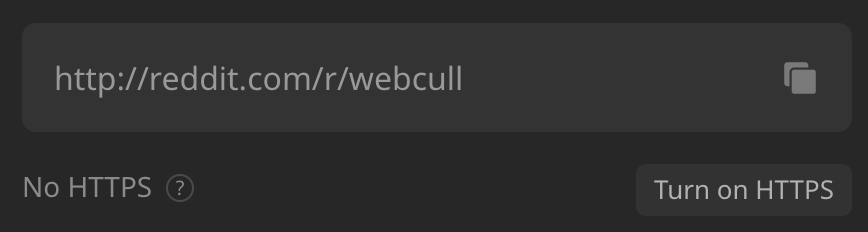

Browsers already do a lot of this work once a page is open. They show site information, connection details, warnings, and “Not Secure” messages when something is wrong. But bookmark managers usually treat URLs as plain saved links. They store the address, title, and maybe an icon, but they do not usually help the user understand whether the saved address is using the protected version of the site. That matters because the browser only gets involved after the link is opened. If the saved URL itself is still using HTTP, the bookmark manager is one of the few places where that problem can be noticed before the user clicks.
WebCull is trying to play a small part in that transition. Browsers already carry much of the responsibility for helping people browse the web more safely, but bookmark managers often do not do enough to protect the saved addresses people return to later. Adding clearer HTTPS indicators, warning when a saved URL is still using plain HTTP, and giving users an easy way to upgrade old links are small changes, but they help make the safer version of the web more visible instead of leaving it hidden in the background.